Introduction
Every month Intigriti puts out a browser XSS challenge. This one is the May 2026 edition.
The challenge is at https://challenge-0526.intigriti.io. If you want to try it yourself before reading, do that first. You will get a lot more out of it that way.
The goal is the usual one. Pop alert(1) on the challenge page. Sounds easy. The catch is the filter sitting in front of it.
I want to be honest about one thing up front. This was an unintended solution. After I submitted, the Intigriti team confirmed my path was not the one they planned for. So this is not the clever intended chain. It is just a simple bug I found by poking at the app, and it worked. Sometimes that is enough.
Challenge Overview
The app is a retro arcade themed site called Pixel Pioneers Arcade. The footer says "Powered by SCA Shield v1.0", which is the name of their filter.
After you log in you get three pages:
- Testimonials - leave a testimonial and see a Community Feed of everyone's testimonials
- Profile - change your display name
- Logout
The page I cared about is Testimonials. You type some text, hit Submit, and your testimonial shows up in the Community Feed below. Each card in the feed shows the testimonial text and the name of the person who wrote it.
That last part is the whole bug.
Finding the Bug
The first thing I did was submit a normal testimonial and look at how the feed renders it. The testimonial text was clearly being cleaned. I threw a few HTML tags into the text box and they all came back stripped or escaped. That is DOMPurify doing its job. The testimonial content is sanitized properly.
So the content box is a dead end. But a testimonial card has two pieces of data. The text, and the author name. The text is sanitized. What about the name?
The name on each card comes from your display name, which you set on the Profile page. I changed my display name to a simple <b>test</b> and went back to Testimonials.
The name rendered bold.
That is the tell. The author name is being written into the page as raw HTML, not as text. The text field gets DOMPurify. The name field gets nothing. The feed builds each card and assigns the stored name straight into the element with the HTML setter:
nameDiv.innerHTML = t.user_name;
Assigning attacker controlled data with the HTML setter is a stored XSS sink. The app sanitized the obvious input and forgot the one next to it. So now I just needed a payload.
The Filter
This is where SCA Shield comes in. I could not just drop <img src=x onerror=alert(1)> in the name and call it a day. The filter blocks a bunch of stuff. From testing, these are the things it does not let through:
- the literal word
alert - parentheses
(and) - dots
. - quotes, both
'and" - commas
, - semicolons
;
That kills almost every payload you would write from memory. No alert(1). No tagged alert call either, because the word alert is still there. No document.cookie because of the dot. No window['alert'] because of the quotes. You have to build the payload out of what is left.
The Payload
Here is what I ended up with:
<details open ontoggle=top[`al`+`ert`]`1`>VISIBLE</details>
Let me break down every part of it, because every part is there for a reason.
Why <details> and ontoggle. When the HTML setter runs with a <details> element that has the open attribute, the browser fires a toggle event on it. So I do not need a click or any user interaction. The element shows up in the feed, the toggle event fires on its own, and ontoggle runs. No parentheses needed to register the handler, it is just an attribute.
Why top instead of window. I needed a reference to the alert function but I could not write window.alert because of the dot, and I could not write window['alert'] because of the quotes. top is a property of window that points back to the top window object. So top gives me the same object as window, and it is short and has no banned characters.
Why [`al`+`ert`]. The filter blocks the literal string alert. So I never write it. I write `al` and `ert` as two separate template strings and join them with +. At parse time the filter sees al and ert, never alert. At runtime JavaScript joins them back into the string alert. And I use backticks instead of quotes because quotes are banned. So top[`al`+`ert`] resolves to window.alert.
Why `1` at the end. This is the part people miss. Parentheses are banned, so I cannot call the function with alert(1). But JavaScript has another way to call a function. A tagged template. If you put a template literal right after a function reference, the function gets called. So someFunction`1` calls someFunction. That means top[`al`+`ert`]`1` calls window.alert with no parentheses at all.
Put together, this resolves to window.alert being called, and the alert box pops. No banned character anywhere in the payload.
The VISIBLE text in the middle is just a marker so I can spot my card in the feed.
Steps To Reproduce
-
Register an account or log in.
-
Go to the Profile page.
-
Set your Display Name to:
<details open ontoggle=top[`al`+`ert`]`1`>VISIBLE</details> -
Click Update Name.
-
Go to the Testimonials page.
-
Submit any testimonial text. The text itself does not matter, anything works.
-
Open the Testimonials page:
https://challenge-0526.intigriti.io/challenge#testimonials -
The Community Feed renders your stored display name as raw HTML. The
<details>element fires its toggle event,ontoggleruns, andalert(1)pops.
That is it. The whole thing is one stored value rendered in the wrong sink.
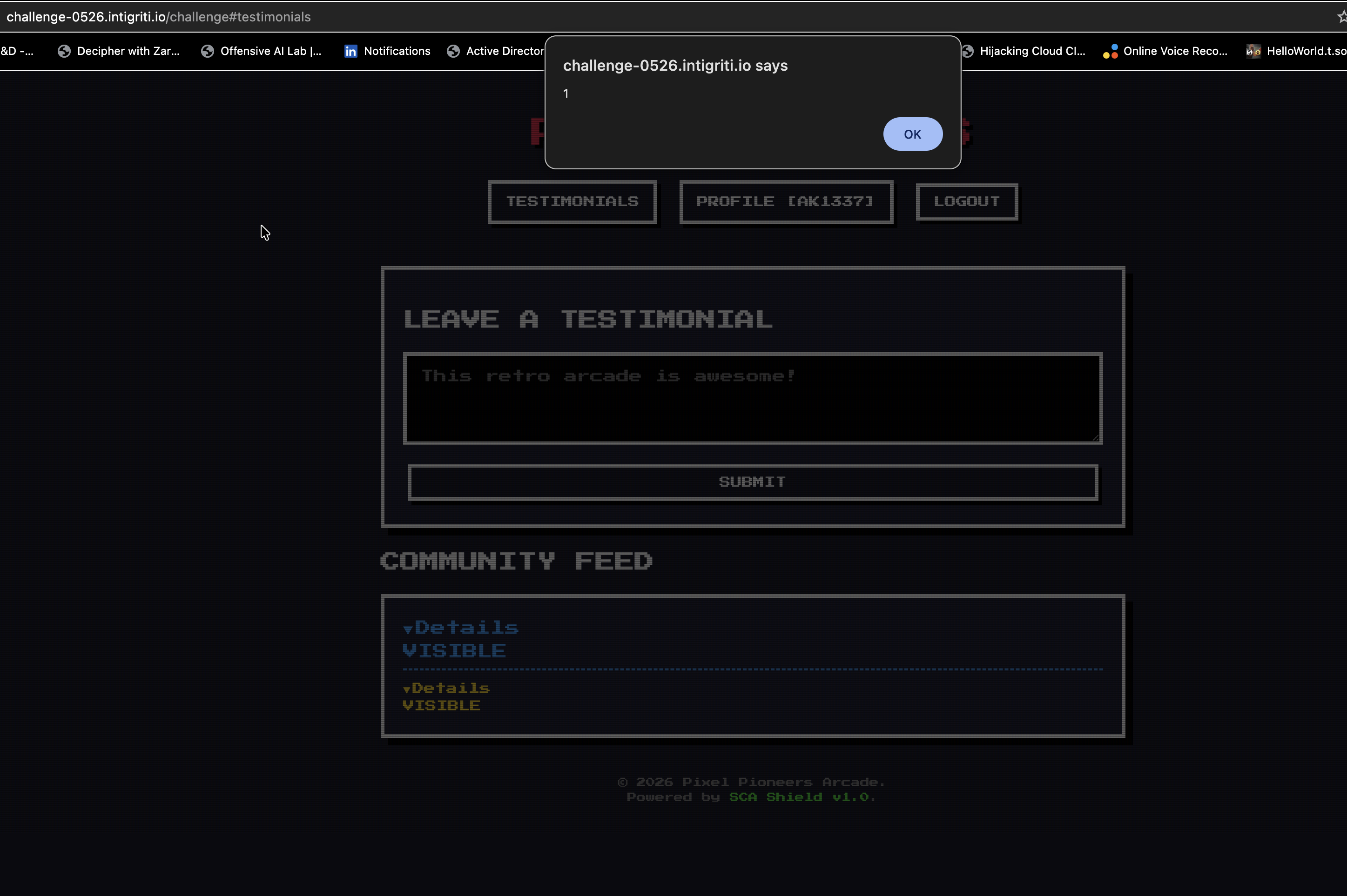
You can see the alert box in the screenshot, and below it the Community Feed showing two of my cards. The Details toggle and the VISIBLE marker are the rendered payload. The alert fired on its own as soon as the page drew the feed.
Impact
This is a stored XSS. The payload lives in the display name on the server. Anyone who opens the Testimonials page renders the Community Feed, and the Community Feed renders my name as raw HTML. So the victim does not have to do anything special. They just have to open the Testimonials page once. The script runs in their browser, in the context of the challenge origin.
Final Thoughts
The lesson here is small but it shows up in real programs all the time. The team clearly knew about XSS. They wired DOMPurify into the testimonial content. They built a whole filter called SCA Shield. But the display name, the field right next to the content, went straight into the page as raw HTML with nothing on it.
When you sanitize one input and not the one beside it, you have not fixed the bug. You have just moved it. Whenever I look at an app I try to list every single piece of attacker controlled data that ends up on a page, not just the obvious one. The obvious one usually has a guard. The one next to it often does not.
The filter part was a fun puzzle on its own. Once you accept that you cannot write alert, cannot use dots, cannot use quotes, cannot use parentheses, you are forced to remember the other ways JavaScript lets you do things. top instead of window. Bracket access instead of dot access. String concatenation instead of a literal. Tagged templates instead of a normal call. None of that is new, but a tight filter is a good way to drill it.
The fix is simple. Render the display name as text, not as HTML. Use the plain text setter instead of the HTML one, or run the name through the same sanitizer the testimonial content already gets. One line.
Thanks to Intigriti for running these every month. Even an unintended solution teaches you something.